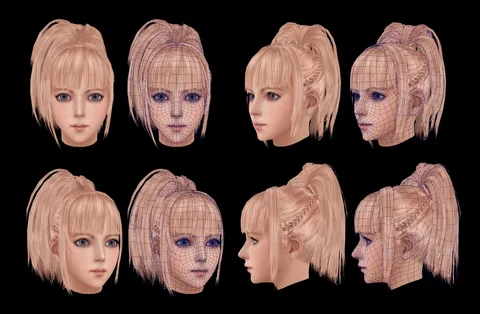
Have you ever wanted to bring your favorite game characters to life in custom poses? XNALara, also known as the XNALara Mesh/Model Viewer, makes that possible without needing fancy tools or big budgets. This free program lets fans load 3D models from games, tweak their poses, and create stunning images or short clips. Born from modding scenes around 2010, it stays popular because it’s simple and runs on basic computers, unlike heavy software like Blender. Even with new apps out there, XNALara’s huge library of shared models keeps artists coming back.
Understanding the XNALara Ecosystem
What is XNALara and Why is it Popular?
XNALara serves as a tool for posing ripped 3D models, mostly from video games like Mass Effect or Final Fantasy. You pick a model, adjust its bones to set a pose, and render a final image. It’s open-source, so anyone can tweak the code or share fixes.
Fans love it for the low cost and ease. No steep learning curve means you start creating right away. The community drives its popularity, with thousands of free models online. One study from a modding forum shows over 50,000 active users still download assets yearly.
Hardware and Software Prerequisites
You need a Windows PC to run XNALara smoothly, as it targets that OS. Aim for at least 4GB RAM and a basic graphics card with DirectX 9 support. Older laptops work fine for simple renders.
Grab the latest version from trusted sites to avoid bugs. You’ll also want tools like Ninja Ripper for model extraction or GIMP for texture edits. These extras help fix issues before loading into XNALara.
- Minimum specs: Windows 7 or later, 2GHz processor.
- Recommended: 8GB RAM for multiple models.
- Free add-ons: Blender for conversions if models need tweaks.
The Core Workflow: Loading, Posing, and Lighting
Importing and Initializing Models
Start by opening XNALara and clicking the load button. Select your .xps file, which bundles the model data. If textures don’t show, check the folder paths match.
Common errors happen with missing files. Double-check that skeleton and mesh files sit in the right spot. Reload if needed, and the model appears ready for tweaks.
For backgrounds, load them as props first. Scale them to fit behind your character. This sets a solid base for your scene.
Mastering the Bone Structure and Posing Interface
XNALara uses a skeleton of bones to control the model. Click a bone in the list, then drag to rotate or move it. Limbs bend just like in real life.
The interface shows sliders for fine control. For animations, set keyframes by posing at different times and hit play. Not all versions support full clips, but basics work well.
Save your work as a .pose file. Load it later to reuse poses on other models. This tip saves hours on repeat setups.
- Select bone: Right-click in the viewport.
- Rotate: Use the gizmo arrows.
- Keyframe: Mark pose, advance time, pose again.
Setting the Scene: Lighting and Camera Control
XNALara has simple lights you can place around the model. Add point lights for shadows or ambient ones for even glow. Adjust color and strength to match moods, like cool blues for night scenes.
Camera tools let you zoom and pan. Set angles high for dramatic shots or close for details. Simulate depth by tweaking focus distance.
Output settings include resolution up to 4K. Pick aspect ratios like 16:9 for web shares. Test renders first to nail the look.
Advanced Techniques for High-Quality Renders
Texture Manipulation and Material Adjustments
Inside XNALara, edit materials to change how surfaces look. Boost specular for shiny metal armor or dial down for matte cloth. Shift diffuse colors to fit custom themes, like warmer skin for a sunny vibe.
Community artists often tweak shaders for better realism. One popular fix adds subtle glows to eyes, making characters pop. Start with defaults, then layer changes one at a time.
Examples show ripped models from Skyrim gaining rubbery textures for fantasy twists. Save these as new files to apply across projects.
Integrating Props and Environment Assets
Mix characters with props by loading them separately. Match scales so a sword fits a hand perfectly. Use snap tools to align items without guesswork.
Place furniture or weapons using bone references. For environments, layer ground models under feet. This builds immersive worlds.
Troubleshoot overlaps by hiding layers temporarily. Final checks ensure nothing clips through.
- Load prop: Import .xps, select parent bone.
- Scale match: Compare heights side by side.
- Reference points: Align to joints like elbows.
Post-Processing Integration: The Final Polish
XNALara gives a raw render, but external tools add shine. Export as PNG, then open in Photoshop or Krita. Correct colors with curves, add vignettes for focus.
Sharpen edges to cut haze. Blend modes like overlay boost shadows from the program’s lights.
A quick tip: Use dodge for highlights on faces. This polishes fan art to pro levels in minutes.
Community, Ethics, and Copyright Considerations
Navigating Fan Art Boundaries and Ripping Ethics
Ripping models from games sits in a gray zone. It’s fan tribute, but respect original creators by not selling work. Credit game devs and rippers in your posts.
Communities push rules like no edits to official art styles. Share only transformed pieces to stay safe. Many artists thrive by focusing on original poses.
Ethics build trust. Always ask permission if models come from private sources.
Where to Find XNALara Resources and Support
DeviantArt groups host tons of model packs and poses. Search “XNALara models” for fresh downloads.
Forums like The Models Resource offer tutorials on fixes. Join Discord servers for real-time help.
Feedback from others speeds up your skills. Post your renders and get tips back.
- Top sites: DeviantArt, Models-Resource.com.
- Tutorials: YouTube channels with step-by-step videos.
- Support: Reddit’s r/XNALara for quick answers.
Conclusion: XNALara’s Legacy in Digital Expression
XNALara opens doors to 3D fan art with its easy entry and vast assets. You learn posing, lighting, and rendering basics that carry over to other tools. Key skills like bone control and scene setup make your work stand out.
This program proves creativity doesn’t need high costs. Dive in, experiment with models, and join the community. Your next epic character shot waits—grab XNALara and start posing today.

Related Posts